How to Automate a Boring Workflow With AI, Step by Step
Learn how to automate a boring workflow with AI in six steps: pick one task, write down the steps, add one model call, add a check, and run it by hand first.
Most people who want to automate a boring workflow start with the tool, not the task. They open an automation app, stare at the options and give up. This guide goes the other way. You pick one dull task, write down its steps, and add AI only where a step needs language or judgment. It is the idea behind the third project in "Your First Builds: Simple Projects", an Intermediate course on AI Entrepreneur, a free web app of short, hands-on lessons on building a business with AI.
What it means to automate a boring workflow
A workflow is a set of steps you repeat in the same order. Something arrives, you do a few things to it, and something leaves. A new email comes in, you read it, you copy a detail into a sheet, you write a reply.
To automate a boring workflow is to hand some of those steps to software so they happen without you. AI adds one new ability: it can handle steps that used to need a human reader, such as sorting a message, pulling facts from messy text or drafting a first reply.
The workflow stays fixed. You decide the steps and their order. The model does a small job inside one or two of them. That is much easier to build and to trust than a system that decides for itself what to do next.
Step 1: Pick one task that is truly boring
Good first tasks share four traits. You do them often, they take the same shape each time, the input is text, and a mistake is cheap to catch.
- Sorting incoming messages into a few piles.
- Turning meeting notes into a list of actions.
- Copying details from emails or forms into a sheet.
- Writing a first draft of a reply you always write in roughly the same way.
Avoid tasks where one error costs real money or upsets a customer, at least at first. Pick something you could do half asleep. That is the sign it is ready to hand over.
Step 2: Write down the steps as you do them today
Do the task by hand three times and write each step as a short line. Do not improve anything yet. You want a plain record of what happens.
Here is an invented example, made up for this guide. A freelance designer gets invoice questions by email. Each one takes about 6 minutes, and there are around 15 a week. The steps are:
- An email arrives.
- Read it and decide if it is an invoice question.
- Find the invoice in the folder.
- Copy the amount and due date.
- Write a short reply with those two details.
- Send it.
Six lines. Now mark each step as rule (a computer can do it with no AI), language (needs reading or writing) or judgment (a person should decide). Steps 1, 3 and 6 are rules. Steps 2, 4 and 5 are language. Nothing here needs a risky decision, which is why this is a good first project.
Step 3: Add one model call, not ten
The common mistake is to ask AI to do the whole job in one go. Instead, give the model one small job per step, with a clear input and a clear output.
For the invoice example, the model does two things:
- Classify. Input: the email text. Output: one word, either "invoice" or "other".
- Draft. Input: the email, the amount and the due date. Output: a three sentence reply.
Everything else stays plain automation: watch the inbox, look up the invoice, put the draft in a drafts folder. A narrow job with a fixed output is easier to test than an open one. If you have not written a good prompt before, how to build a simple AI tool from one good prompt shows how to ask for a fixed shape of answer.
Step 4: Keep a person in the loop at the end
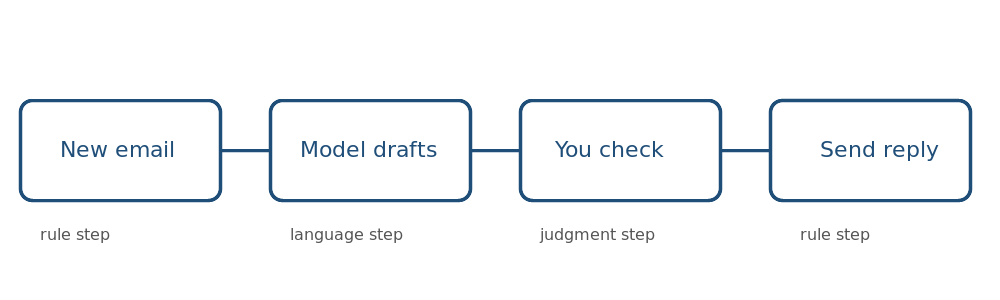
For the first weeks, the workflow should stop before the last step. Let it draft the reply and leave it in a folder. You read it, fix it if needed and press send.
This costs about 30 seconds per email instead of 6 minutes, and it keeps you in charge while you learn how often the model is wrong. The designer in the example saves roughly 80 minutes a week this way, and no customer ever sees an unchecked reply.
Once the drafts have been right for a while, you can decide whether to send some of them automatically. Do that one narrow case at a time, and only for cases where a wrong reply is harmless.
Step 5: Test it on real examples before you trust it
Collect about 20 real inputs, as a rule of thumb. Include the odd ones: an email in a rush, an email that is not about invoices, an email with two questions. Write down what the right output would be for each.
Run the workflow on all of them and count the misses. When a case fails, change the prompt or the steps and run all 20 again, so a fix for one case does not break another. This habit grows into a real eval set for an AI feature if the workflow ever becomes part of a product.
Step 6: Run it, measure it and grow it slowly
Switch it on for real, and keep two numbers: how many items it handled and how many drafts you had to fix. If you fix more than a couple out of ten, go back to step 5 before adding anything.
When the numbers are steady, widen it one step at a time. Add a second kind of email. Add a log of what was sent. Each addition is a small change you can test, not a rewrite.
If the workflow saves time for you, ask whether other people have the same dull task. A tool that removes a chore for one freelancer may do the same for many. Before building a product, test demand with a landing page and a waitlist.
Common mistakes
- Starting too big. Automating a whole department is a project for later. Start with one task.
- Skipping the written steps. If you cannot list the steps, you cannot automate them.
- Using AI for rule steps. If a plain rule does the job, use the rule. It is cheaper and never changes its mind.
- Removing the person too early. Wait until you have seen many correct drafts.
- Never checking. A workflow that was right in March can drift by June. Spot check a few items every week.
Frequently asked questions
What is the easiest workflow to automate with AI?
One that is frequent, text based and low risk, such as sorting messages or drafting a standard reply. Avoid anything where one wrong output is costly.
Do I need to code to automate a boring workflow?
Not always. Many automation tools let you connect steps without code, and the model call is just a prompt. A little code helps when you want more control, but it is not required to start.
How do I know the automation is working?
Test it on about 20 real examples first, then count how many outputs you fix after launch. If the fixes keep rising, pause and retest.
Should the AI send messages without my approval?
Not at first. Draft, then review. Allow automatic sending only for narrow cases where you have seen it right many times and a mistake is harmless.
Get started
Pick one boring task today and write its steps in six lines or fewer. Mark each step as rule, language or judgment, and you already have a plan. For a guided version, the course "Your First Builds: Simple Projects" on AI Entrepreneur ends with "Project 3: Automate One Boring Workflow". Lessons take 8 to 12 minutes each and every lesson is free. Sign in on the home page with a 6-digit code sent to your email and start.