How to Build an Eval Set for an AI Feature (Step by Step)
Learn how to build an eval set for an AI feature: collect real examples, define pass criteria, score outputs, and catch regressions before users do.
You are about to ship an AI feature, or you already did, and you have no good way to tell whether it works. You read a few outputs, they look fine, and you move on. That does not scale. This guide shows how to build an eval set for an AI feature, step by step, so you can measure quality instead of judging by eye. The topic is covered in the Advanced course "Evals: Shipping AI That Works" on AI Entrepreneur, a free web app of short lessons on building a business with AI.
How to build an eval set for an AI feature: what it is and why you need one
An eval set is a fixed collection of test cases for your AI feature. Each case has an input, a note on what a good output looks like, and a way to score what the model returned. You run the whole set, get a number, and compare it with the last number.
Why bother? Because AI output is not the same every time, and it fails in quiet ways. A model can sound confident and still be wrong. The lesson "What AI Gets Wrong" in the course "How Modern AI Actually Works" covers the limits every builder must design around. An eval set is how you design around them with evidence.
Without one, every change is a guess. You tweak the prompt to fix one complaint and break three cases you forgot about. With one, you see that right away.
Define what good output looks like before you collect data
Do this first, and do it in plain words. Pick one feature. Write down what a good answer does and what a bad answer does.
Say your feature turns a customer email into a short support summary. A good summary might:
- Name the customer's actual problem in one or two sentences.
- Keep any order number or date exactly as written.
- Add nothing the customer did not say.
A bad summary invents details, drops the order number, or gets longer than the email. These rules become your scoring criteria later. If you cannot write them down, you are not ready to build the set yet. If your feature began as a single prompt, building a simple AI tool from one good prompt is a good place to get that definition clear.
Collect real examples from users, logs, and edge cases
Real inputs beat invented ones. Pull from three places.
- Real users. If you have run the feature even a little, use the actual inputs people sent. If you have no users yet, ask a few people to try it. The customer interviews in this guide to validating a business idea are a natural source of real examples.
- Logs. Look at the outputs that got complaints, edits, or retries. Those are your hardest cases, so keep them.
- Edge cases you write yourself. Empty input, a very long input, a message in another language, a rude message, a message that tries to steer the model off its job.
Aim for a mix. Mostly ordinary cases, plus a fair share of hard ones. If every case is easy, your score will be high and tell you nothing.
Write expected answers and a clear scoring rubric
For each case, write down what you expect. Sometimes that is one exact answer. More often it is a short list of things the output must or must not contain.
Here is one case for the support summary feature:
- Input: an email saying order 48213 arrived broken and the customer wants a replacement, not a refund.
- Must include: order 48213, broken item, wants a replacement.
- Must not include: a refund offer, or any promise about timing.
Then turn your rules into a rubric. Keep it small. Three to five yes or no checks are easier to apply the same way every time than a vague score out of ten. "Does it keep the order number?" is a check two people will answer alike. "Is it good?" is not.
Choose how to score: exact match, code checks, or LLM-as-judge
You have three ways to score a case. Use the cheapest one that works.
Exact match
Use this when there is one right answer, such as a category label or a yes or no. Compare the output to the expected value. It is fast and has no ambiguity.
Code checks
Use this for rules a program can test. Is the output valid JSON? Does it contain the order number? Is it under 60 words? These checks are free to run and never disagree with themselves.
LLM-as-judge
Use this for qualities code cannot see, like "does the summary add anything the customer did not say?" You give a second model the input, the output and your rubric, and ask it to answer each check. It is flexible, but it can be wrong too. Read a sample of its verdicts yourself, and fix the rubric wording when you disagree with it. The lesson "Building an Eval Set and Judging Outputs" in the Evals course goes through this step.
A good habit is to use code checks for everything you can, and a judge only for the rest.
Start small: a 30 to 50 case eval set you can run in minutes
You do not need hundreds of cases to start. A set of 30 to 50 is enough to catch most obvious breakage, and small enough to run in minutes and to read by hand. That is a practical rule of thumb, not a magic number. Grow it later.
A simple layout to aim for:
- About 25 ordinary cases from real inputs.
- About 10 hard cases from past failures.
- About 5 to 10 edge cases you wrote.
Store the set in a plain file, one case per row: input, expected notes, and which checks apply. A spreadsheet export or a JSON file both work. What matters is that it is fixed, saved, and the same every time you run it.
Run evals on every prompt or model change to catch regressions
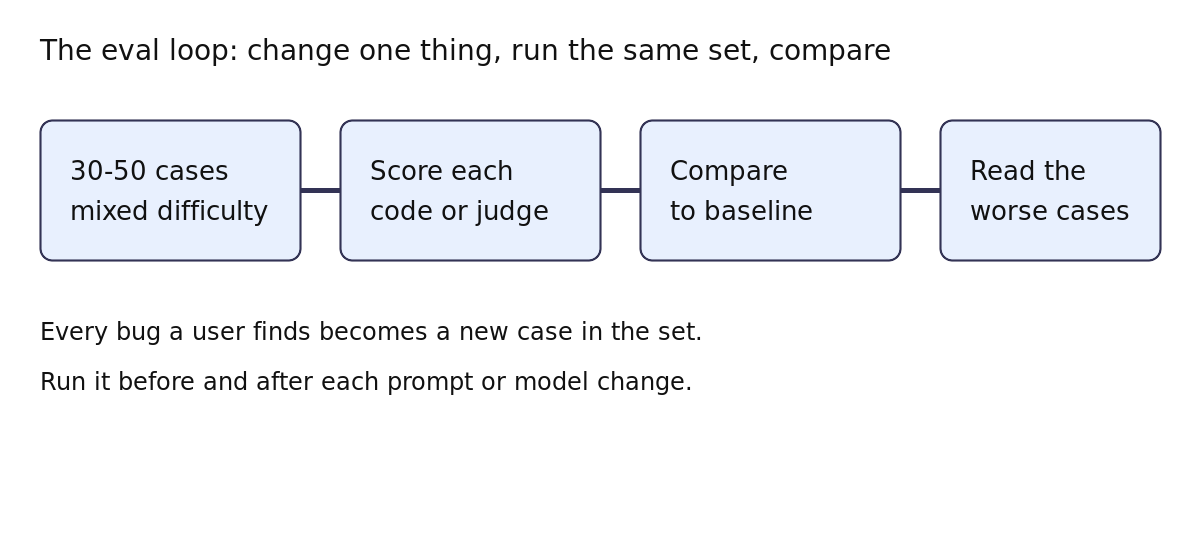
An eval set earns its keep when you run it often. Run it before and after every change to the prompt, the model, or the data you feed in. A drop in score is a regression, and you find it before your users do.
A workable routine:
- Run the set on your current version and save the score. This is your baseline.
- Make one change.
- Run the set again and compare.
- Look at the cases that got worse, not just the average.
Change one thing at a time, so you know what caused the shift. Model choice matters here too. The course "The AI Product Stack" covers choosing models, and an eval set lets you compare a bigger and a smaller model on your own task. Cost counts as well, and how token billing works will help you weigh a cheaper model against its score.
Keep your eval set alive as your product grows
A set you never touch goes stale. Your users change, your product changes, and new failures appear. Keep adding to it.
- Every bug becomes a case. When a user finds a failure, add that input to the set so it cannot return unnoticed.
- Refresh with new real inputs. Swap in recent examples so the set matches what people send now.
- Retire cases that no longer apply. If you drop a feature, drop its cases.
- Recheck your judge. Read some verdicts again every so often to be sure it still agrees with you.
This also ties to running AI in production, the third lesson in the Evals course. Real traffic is where your best new cases come from. And if your edge over competitors is quality, a strong eval set is part of how you keep it. See what moats still work when anyone can call the same model.
Frequently asked questions
How many test cases do I need in an eval set?
Start with 30 to 50. That is enough to catch obvious breakage and small enough to read by hand. Add a case every time you find a new failure.
Can I use an LLM to score the outputs?
Yes, for qualities code cannot check. Give the judge a clear rubric, then read a sample of its verdicts yourself to be sure you agree with it.
Should I write the eval set before or after I build the feature?
Write your definition of good output first, then collect cases as you build. Even a handful of cases early on beats judging by eye.
What is a regression?
A regression is when a change makes something that used to work stop working. Running your eval set after each change shows you which cases got worse.
Get started
Pick one AI feature and write down what a good answer looks like today. Then collect your first ten real inputs. That alone puts you ahead of judging by eye. If you want a guided path, the Evals course on AI Entrepreneur has three short lessons on why you need evals, how to build the set and judge outputs, and how to run AI in production. Every lesson is free. Sign in on the home page with a 6-digit code sent to your email and take your first lesson.