How to Use an LLM as a Judge to Grade AI Outputs
How to use an LLM as a judge to grade AI outputs: write a rubric, build the judge prompt, check it against your own labels and watch for its biases.
If you want to know how to use an LLM as a judge to grade AI outputs, the short version is this: you write down what "good" means, turn that into a prompt for a second model, and check that model's grades against your own before you trust it. This guide walks through that process with one running example, a support bot that answers customer emails. Evals are also the subject of an Advanced course in the free lessons at AI Entrepreneur.

What an LLM judge is and when to use one
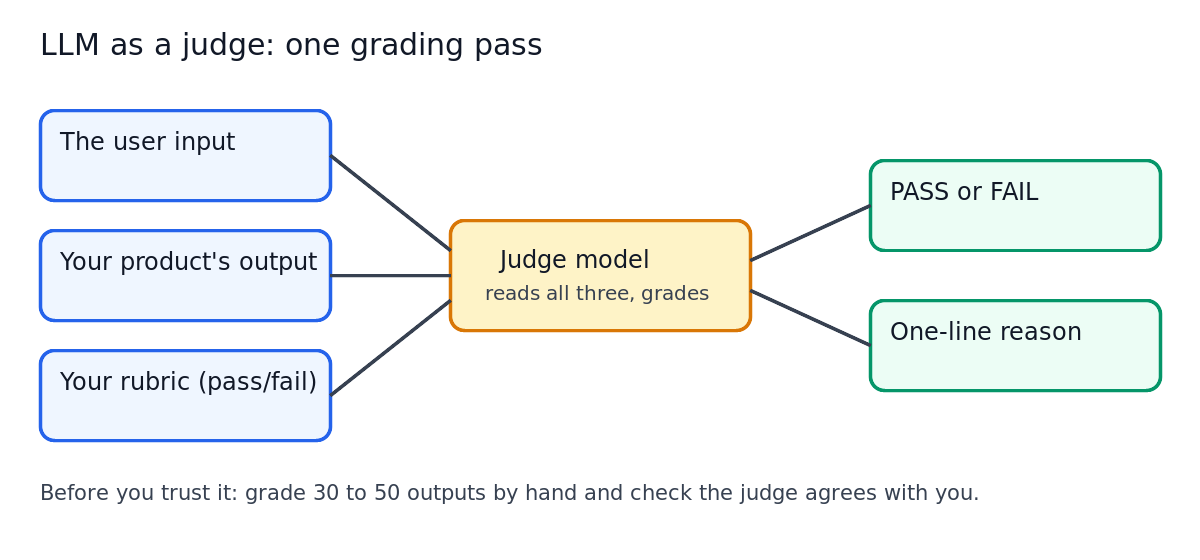
An LLM judge is a language model you ask to grade another model's output. You give it the input, the output and a rubric; it returns a grade and a short reason.
It is one tool inside a larger habit: measuring quality instead of judging by eye. If you have no evals yet, start with what LLM evals are and why your AI product needs them. A judge only makes sense once you have a set of test cases to run it on.
Use a judge when the quality you care about is hard to check with code. Code can confirm a reply is under 200 words or contains a link. It cannot easily tell whether the reply answered the customer's question. That is where a judge earns its place.
Do not use a judge for what code can check exactly. If the rule is "output must be valid JSON," parse it. A plain check is cheaper and never disagrees with itself.
Pick what to grade: pass/fail, scores, or pairwise comparisons
There are three common formats. Pick one per question.
- Pass/fail. "Did the reply answer the question using only facts from the help docs? Yes or no." The easiest to write a rubric for and to check against your own labels.
- Scores. "Rate helpfulness from 1 to 5." Richer, but the gap between a 3 and a 4 is hard to define, so describe every point.
- Pairwise. "Here are two replies to the same email. Which is better?" Useful when you compare two prompts or two models.
For the support bot, start with pass/fail and split "good reply" into narrow questions: did it answer the question, did it stick to the docs, was it polite? Three narrow judges are easier to trust than one vague score.
Write a clear rubric before you write the judge prompt
Most weak judges come from a weak rubric, not a weak model. If a new teammate could not apply the rule, neither can the model.
Here is a rubric for the "stuck to the docs" check:
- Pass if every factual claim in the reply (prices, steps, limits, feature names) appears in the provided help doc excerpt.
- Fail if the reply states any fact not in the excerpt, even if it might be true.
- Pass if the reply says "I'm not sure, let me check with the team" when the excerpt does not cover the question.
- Edge case: general politeness ("Thanks for reaching out") is not a factual claim and does not count.
Grade 20 real outputs yourself with this rubric, and every time you hesitate, add a line. Your hesitations are where the judge will wobble too.
How to use an LLM as a judge: build the prompt step by step
Build the judge prompt in this order.
- Set one task. One judge, one question.
- Paste the rubric. Word for word, edge cases included.
- Give the inputs, clearly labeled. The customer email, the doc excerpt, the bot's reply.
- Ask for reasoning first, then the verdict. The explanation gives you something to read when you disagree.
- Fix the output format. For example, ask for a final line that reads only
VERDICT: PASSorVERDICT: FAILso your script can parse it. - Add two or three labeled examples. One clear pass, one clear fail, one tricky case with the right answer explained.
A trimmed version might look like this:
You are grading one thing: whether a support reply sticks to the provided help docs. Rubric: Pass if every factual claim in the reply appears in the doc excerpt. Fail if the reply states any fact not in the excerpt. Pass if the reply admits it does not know when the excerpt does not cover the question. Greetings and thanks are not factual claims. Customer email: {email} Doc excerpt: {docs} Reply to grade: {reply} First, list each factual claim in the reply and say whether it appears in the excerpt. Then write a final line: VERDICT: PASS or VERDICT: FAIL.
Check your judge against human labels before you trust it
A judge is itself an AI system, so it needs its own eval.
- Take real outputs from your bot: easy passes, obvious failures, awkward middle cases.
- Label each one yourself with the rubric, before you see the judge's answer.
- Run the judge on the same set, count how often you agree, and read every disagreement.
Here is a made-up illustration. You label 40 support replies. The judge agrees with you on 34, which is 85 per cent. You read the 6 disagreements: 4 are replies that invented a refund window the docs never mention, and the judge passed them. That tells you exactly what to fix: add a rubric line that any time limit or amount must appear word for word in the excerpt, add one of those replies as a fail example, and run the 40 again.
Watch most closely for failures the judge called passes. A docs judge that misses made-up facts gives you false confidence. Repeat the loop until disagreements are rare and you understand the ones left.
In AI Entrepreneur, this step has its own lesson, Building an Eval Set and Judging Outputs, and like every lesson it lists its sources so you can read the original work.
Common judge biases and how to reduce them
Judges have habits. A 2023 research paper on the method, Judging LLM-as-a-Judge with MT-Bench and Chatbot Arena (Zheng and others), looked at position, verbosity and self-enhancement biases. It also found that strong judges such as GPT-4 agreed with human preferences more than 80 per cent of the time, about as often as humans agree with each other. That is a good result on their benchmark, not a promise about your product, so test for each habit yourself.
- Position. In pairwise grading, a judge may favour the first or second answer. Run each pair twice with the order swapped, and count a win only if it holds both ways.
- Length. A judge may reward longer, more detailed answers even when the short one is better. Put short correct replies and long padded ones in your labeled set. If length wins, add a rubric line saying length does not count.
- Self-preference. A judge may grade outputs from its own model family more kindly. When you compare two models, check the judge against your labels for both.
The fix is the same each time: narrow the question, tighten the rubric, and recheck against your labels.
Run your judge on real traffic and track results over time
Once the judge agrees with you, put it to work in two places.
Before you ship a change. When you edit the bot's prompt or switch models, run the eval set through the bot and the judge, and compare the pass rate with the last version. A drop is a regression caught before a customer sees it.
After you ship. Grade a sample of real conversations each week. Track each check's pass rate. A sudden dip means something changed: new kinds of questions, a docs update, or a change at your model provider.
Keep a human in the loop. Every week, read a handful of judged outputs yourself, especially the failures, and add surprising cases to your eval set. It should grow from real traffic, not stay frozen at day one. This stage is the subject of the lesson Running AI in Production.
For an agent that takes actions, a judge can grade whether each step made sense; see how to build an AI agent that does a real job safely.
Frequently asked questions
Can the same model generate and judge its own outputs?
You can, and it is often fine for narrow pass/fail checks. Check it against your own labels, and if it goes easy on its own outputs, use a different model as the judge.
How many human-labeled examples do I need to validate a judge?
There is no fixed number. 30 to 50 replies that cover clear passes, clear failures and tricky middle cases is a practical start; keep adding labels from real traffic until disagreements are rare and you understand each one.
Is LLM as a judge cheaper than human review?
Each judge call is a model request that costs tokens, more as you send more text. Compare that with a person's time reading the same outputs; the AI Entrepreneur lesson Model APIs, Tokens and What a Request Costs shows how to work out what a request costs.
Which model should I use as the judge?
Start with a capable model, get it agreeing with your human labels, then try a smaller, cheaper one on the same labeled set and keep it only if agreement holds. The lesson Choosing Models: Big, Small, Open, Closed covers how to weigh that trade.
Get started
The Advanced course Evals: Shipping AI That Works has three short lessons: Why Your AI Product Needs Evals, Building an Eval Set and Judging Outputs, and Running AI in Production. Each takes 8 to 12 minutes, starts with a problem and checks you with questions, which come back later in spaced review. If you have not built anything yet, start with how to build your first AI product without writing code, then come back and grade it.
Every lesson is free. Start learning with AI Entrepreneur: sign in on the home page and take your first short lesson today.