How to Build Your First AI Product Without Writing Code
Learn how to build your first AI product without writing code: pick a problem, choose no-code tools, test with real users, and launch in days, not months.
You can build your first AI product without writing code. You need a narrow problem, a model you can talk to, a simple way for people to use it, and a habit of testing it on real examples. This guide walks through how to build your first AI product without writing code, using one worked example from idea to first users. If you want structured practice alongside it, AI Entrepreneur is a free web app of short lessons on building and launching a business with AI.
What counts as an AI product (and what you can build without code)
An AI product is something a person uses to get a result, where a language model does part of the work. The model is not the product. The product is the whole job done for someone: the input they give, the output they get, and the checks in between.
Without code, you can build three kinds of things:
- A prompt-powered micro tool. One input, one carefully written prompt, one useful output.
- A workflow. A fixed chain of steps, such as a form submission that triggers a prompt and sends the result by email.
- A demand test. A landing page and a waitlist that show whether anyone wants the thing before you build more.
These are the same three starter projects covered in the Intermediate course "Your First Builds: Simple Projects" in AI Entrepreneur. You can do all of them with no-code tools. What you cannot do without code is build something with heavy custom logic. That is fine for a first product. You want the smallest thing that teaches you something.
Pick a narrow problem worth solving
Most first products fail because the problem is too broad. "AI for small businesses" is not a problem. "A freelance electrician spends 40 minutes writing each quote from messy site notes" is a problem (an invented example, used through this guide).
Use three tests:
- You can name the person. Not a market, a person with a job title and a bad afternoon.
- The task repeats. If they do it once a year, they will not pay for help.
- A good output is easy to recognize. A person can look at the result and say "yes, that is right" or "no, fix this." This matters later when you test.
Then talk to five people who have the problem. Ask what they did the last time it happened. Do not pitch. The lesson "Talking to Customers Without Fooling Yourself" in the app covers how to ask questions that give honest answers instead of polite ones.
Also ask whether your idea is a thin wrapper. If the only thing you add is a chat box around a model, anyone can copy it. Your edge is more likely the specific workflow or the format your customer needs. The lesson "Thin Wrapper or Real Product?" goes deeper.
Choose your no-code stack: model, interface, and automation
A no-code AI product has three parts. Pick one tool for each and resist adding more.
- The model. A chat assistant is enough to start. You write and refine the prompt there before you connect anything.
- The interface. Where the user types or uploads their input. A simple form or a landing page with a form works.
- The automation. The glue that takes the form entry, sends it to the model with your prompt, and delivers the answer. Many no-code automation tools can do this with a few steps and no programming.
When you connect a model through an automation tool, you are usually using a model API. Every request has a cost that depends on how much text goes in and comes out, counted in tokens. The lesson "Model APIs, Tokens and What a Request Costs" explains this. Longer inputs and outputs cost more, so keep your prompt tight.
Turn your idea into one good prompt and workflow
Do the prompt first, by hand, before you build any automation. If the prompt does not work in a chat window, no workflow will fix it.
Here is a worked example, made up for this guide. The product: a quote drafter for freelance electricians. The user pastes rough site notes and gets back a clear quote summary they can edit and send.
You are an assistant for a freelance electrician. Turn the site notes below into a client-ready quote summary. Use this structure: 1) a two-sentence summary of the job, 2) a list of work items, 3) materials needed, 4) questions I should ask the client before confirming. Do not invent prices or measurements. If something is missing from the notes, list it under "Questions" instead of guessing.
Notice what this prompt does. It names the role, fixes the structure, and says what to do when information is missing. That last instruction matters most. Language models can produce confident text that is wrong, so you tell the model to flag gaps instead of filling them. The lesson "What AI Gets Wrong" covers why this happens and how to design around it.
Then sketch the workflow in plain steps:
- The user fills in a form with their site notes.
- The automation sends the notes plus your prompt to the model.
- The model's answer is emailed to the user, or shown on a results page.
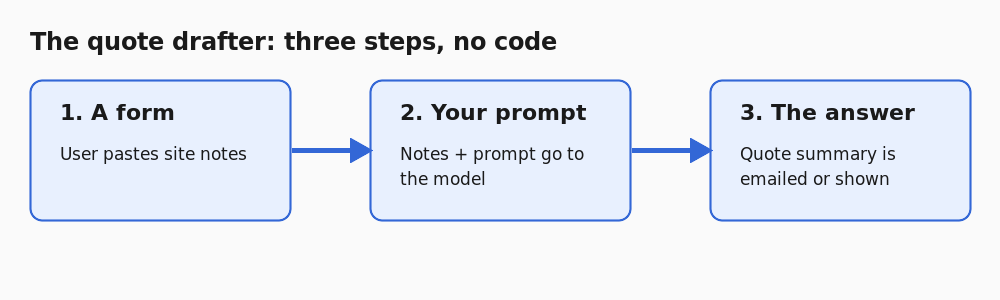
Three steps. That is a fixed workflow, not an agent, and for a first product that is what you want. Fewer steps means fewer places to fail. If you want a longer walkthrough of this part, read how to build a simple AI tool from one good prompt.
How to build your first AI product without writing code, step by step
Here is the build order that keeps you from wasting a weekend.
- Write a one-line promise. "Paste your site notes, get a quote summary in under a minute." If you cannot say it in one line, the product is too wide.
- Refine the prompt in a chat window. Run it on at least five real inputs. Edit the prompt each time it misses.
- Build the form. One input box, one button. Skip accounts and settings.
- Connect the automation. Form entry in, prompt plus entry to the model, answer out.
- Run it yourself ten times. Use real notes, not tidy ones. Watch for broken formatting, long delays and odd answers.
- Put a landing page in front of it. State the promise, show an example output, and add a way to join a waitlist or try it.
Resist the urge to polish. The lesson "The MVP and the Build-Measure-Learn Loop" makes the point: ship the smallest thing that teaches you something, then learn from what happens.
Test it with real examples before anyone pays
Judging output by eye on one or two examples is how bad products reach customers. Build a small set of test cases instead.
For the quote drafter, collect 15 to 20 real or realistic site notes. Include messy ones, short ones, and ones with missing details. For each, write down what a good output must contain. For example: "must list the missing circuit count as a question, must not state a price."
Then run every case after each change to your prompt. Count how many pass. If a prompt edit fixes one case and breaks three others, you will see it. This is the core idea behind evals, and the app has a lesson called "Building an Eval Set and Judging Outputs" on it. For a step-by-step version, see how to build an eval set for an AI feature.
Keep a human in the loop at first. In the example, the electrician edits the draft before it goes to a client.
Launch, price, and get your first users
You do not need an audience to find your first users. You need ten people with the problem. Go to where they already are: forums for their trade, groups they belong to, or direct messages to the people you interviewed earlier. Offer to set it up for them. The posts on getting your first 10 customers and launching with no audience cover this in detail.
On price, remember that every use of your tool costs you something in model fees. Work out the cost of a typical request, then set a price that leaves room. A flat low price with unlimited use is how you lose money on your heaviest user. Read how to price an AI product without losing money per user before you set yours.
No tool or course can promise you customers or income. What you control is how fast you learn from real users.
Frequently asked questions
Can I really build an AI product with no coding skills?
Yes, for a simple product. A prompt, a form and an automation tool can deliver a useful result to a real user. You will hit limits if you need custom logic, but you can learn a lot before you reach them.
What should my first AI product be?
Pick one repeated task for one kind of person, where a good output is easy to recognize. Narrow beats clever. A tool that does one job well is easier to test, price and explain.
How do I know my AI product works well enough to share?
Build a small set of real test cases and write down what a good answer must include. Run all of them after every prompt change and track how many pass. Do this before anyone pays.
How much does it cost to run?
Each request to a model has a cost based on the tokens going in and out. Estimate the cost of a typical request, then price above it. The lesson "Model APIs, Tokens and What a Request Costs" in AI Entrepreneur explains how.
Get started
Every lesson is free. Start learning with AI Entrepreneur: sign in on the home page and take your first short lesson today. The Intermediate courses on finding opportunities, your first builds and launching and pricing follow the same path as this guide, in lessons of 8 to 12 minutes each.