What Is a Context Window and Why It Matters for AI Products
What is a context window? The plain answer for builders: what fills it, what happens when it runs out, and how to budget it for an AI product.
If you build on a model API, you will ask this early: what is a context window, and why does everyone keep talking about its size? The short answer: it is everything the model can read when it writes one reply, plus the reply itself. It decides what your product can "see", what each request costs, and how often the answer goes wrong. This guide explains it in plain words, walks through a worked budget for a support assistant, and shows the four habits that keep a product inside the limit. The AI Product Stack course in AI Entrepreneur's free lessons goes through the same ground, from what a request costs to retrieval and choosing a model.
What is a context window? A plain definition
Anthropic's documentation on context windows defines it as all the text a language model can reference when it generates a response, including the response itself. It calls it the model's "working memory", and separates it from the much larger body of text the model was trained on.
Think of a desk. Whatever is on the desk, the model can use. Whatever is not on the desk does not exist for the model in that moment. It cannot walk to another room for a file unless your product puts the file on the desk first.
This is the idea most new builders miss. The model does not remember your last conversation on its own. Your app sends the history back with every request. If the history is not in the window, the model has never seen it.
Tokens: how a context window is measured
Windows are measured in tokens, not words. A token is a chunk of text: a short word, part of a longer word, or a punctuation mark. Code, numbers and languages other than English often split into more tokens than you would guess.
Sizes vary a lot by model. In that same documentation, Anthropic lists several current Claude models with a window of 1 million tokens, and others with 200,000. Check the page for the model you use, because these numbers change.
Two rules follow:
- Count, do not guess. Anthropic's API reports the tokens each request used and offers a way to count a request before you send it; use that or your provider's equivalent on your real prompts and documents.
- Input and output share one budget. The more you send, the less room is left for the answer.
Tokens also set the price. Model APIs bill per token, so the size of what you send is the size of your bill. Our post on what an AI API call costs works through that arithmetic.
What fills the window in one request
Anthropic's page is specific about what counts: the system prompt, every message (including tool results, images and documents), the tool definitions, and the output the model writes, including any thinking it does. In a typical product, that means:
- The system prompt: your instructions, tone and rules.
- Tool definitions: the description of each tool the model may call.
- Documents: help articles or records you fetched for this question.
- Conversation history: earlier messages and replies.
- The new message from the user.
- Room for the reply.
A worked example: budgeting a support assistant
Say you are building a support assistant for a small software company. These numbers are made up for the example, but the method is the one to use on your own product. One turn looks like this:
- System prompt: 2,000 tokens
- Tool definitions (order lookup, refund check): 3,000 tokens
- Five retrieved help articles at 1,500 tokens each: 7,500 tokens
- The last 20 turns of chat at about 400 tokens each: 8,000 tokens
- The new question: 1,000 tokens
- Room for the reply: 2,800 tokens
Add them up: 24,300 tokens. Against a window of 200,000 or 1 million, that is small. So why not paste in the whole help center?
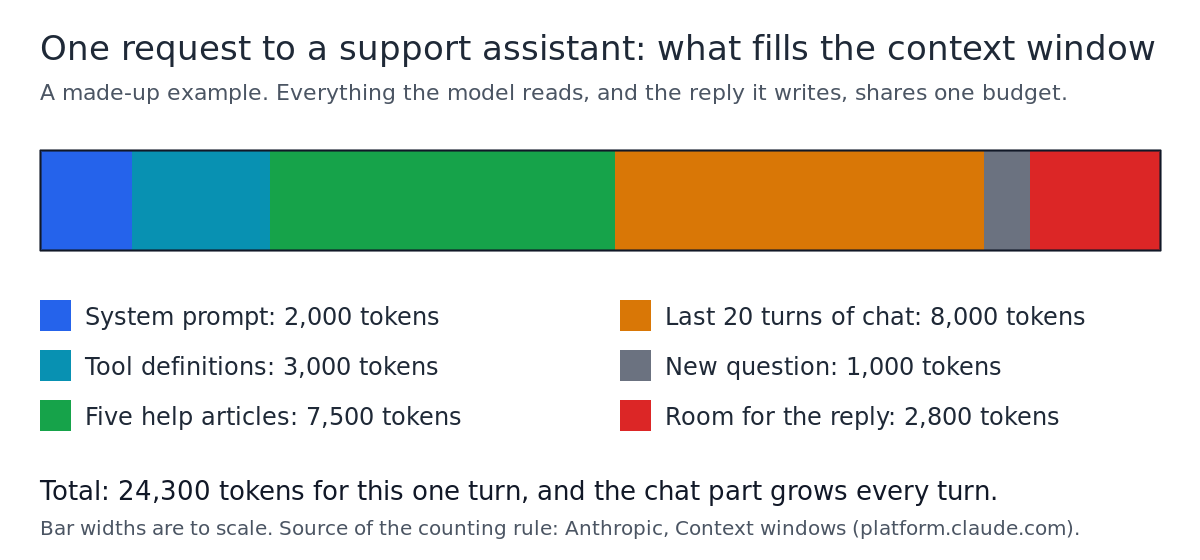
Look at the orange part. The chat history is the only line that grows by itself. At turn 40 it is about 16,000 tokens, and every one of them is sent, and billed, again on every turn. The window is rarely what stops you first. Cost and quality are.
Why a bigger context window is not automatically better
Anthropic's documentation says it directly: more context is not automatically better. As the token count grows, accuracy and recall degrade, which it calls context rot. Its advice is that choosing what goes in matters as much as how much space you have.
Research found a related pattern. In "Lost in the Middle" (Liu and others, 2023), models did best when the useful information sat at the start or end of a long input, and noticeably worse when it sat in the middle, even models built for long inputs.
For a product, that turns into three costs your users and your margin feel:
- Money. A request with 90,000 tokens of context costs far more than one with 24,000, on every turn, for every user.
- Waiting. More to read usually means a slower start to the answer.
- Wrong answers. More text gives the model more chances to grab an outdated article or miss the one line that mattered.
What happens when you run out of context
On Anthropic's API, a request whose input alone is larger than the window is refused with a "prompt is too long" error. The same page notes that chat interfaces can instead manage the window on a rolling "first in, first out" basis, dropping the oldest messages.
That second behavior is the dangerous one if you build it yourself. If your code trims from the top and your rules sit at the top, your instructions can quietly vanish. Trim old chat turns on purpose, and never trim the system prompt.
How to design around context limits
The goal is the right tokens on the desk, not the most tokens. Four habits do most of the work.
- Retrieve, do not paste. Search your documents for the few passages that match the question and send only those. That is the "five help articles" line in the example. Our plain guide to retrieval augmented generation (RAG) explains how it works.
- Summarize old turns. Past turn 10, replace older messages with a short summary that keeps the user's goal, decisions made and open questions, and send the last few turns in full.
- Keep memory in your own database. Store lasting facts, such as a customer's plan, outside the model and put back only what this request needs. "Memory" in an AI product is almost always your app choosing what to send.
- Fetch with tools when needed. Let the model ask for one order or one file instead of loading everything up front. The Model Context Protocol (MCP) is one standard way to connect those tools. Tool results land in the window too, so trim large ones.
Put your key instructions where the model weighs them most: at the start of the system prompt, with the most important rule repeated near the end of a long request. Then test it. Hide a known answer at the start, middle and end of a long prompt, and check the model finds it each time.
Frequently asked questions
Is a bigger context window always better?
No. A bigger window lets you send more, but more input costs more, can be slower, and Anthropic's own documentation says accuracy and recall degrade as the token count grows. Send the smallest set of relevant context that still answers well.
Is the context window the same as the model's memory?
Only for one request. Anything the model seems to remember across conversations is your app storing information and putting the relevant part back into the window each time.
Does the reply count toward the context window?
Yes. The output, including any thinking the model does, shares the same budget as your input, so leave room for it.
Do AI agents need bigger context windows?
Agents run many steps, so their windows fill with tool results and old attempts faster than a chat does. Good agent designs summarize progress and drop stale output. For the rest of a sound design, see our guide to building an agent that does a real job safely.
Get started
The context window ties together three things a founder has to get right: what a request costs, how your data reaches the model, and which model you choose. AI Entrepreneur's AI Product Stack course covers all three in three short lessons, and How Modern AI Actually Works covers what a language model really does and the limits every builder must design around. Lessons take 8 to 12 minutes each, come with questions that check you, and list their sources so you can read the original work.
Every lesson is free. Start learning with AI Entrepreneur: sign in on the home page and take your first short lesson today.