What Is MCP (Model Context Protocol) and Why It Matters
MCP (Model Context Protocol) is an open standard that connects AI models to tools and data. Learn how it works and why it matters for AI founders.
If you build with AI, you will keep hearing about MCP. Here is the short answer to what is MCP (Model Context Protocol) and why it matters: it is an open-source standard, described on the official MCP site as a way to connect AI applications to external systems. It lets an AI application connect to tools and data through one common interface, instead of a custom integration for every pair. This post covers how it works, what it changes for a small founder, and where it can hurt you. AI Entrepreneur is a free web app of short lessons on building a business with AI. It has no lesson on MCP itself, but several lessons cover the ideas MCP sits on, and I point to them below.
What is MCP (Model Context Protocol) and why it matters
A language model on its own only produces text. To do useful work for a business, it has to read a customer record, search your documents, or send a draft email. Each of those needs a connection between the model and something outside it.
The Model Context Protocol, or MCP, is an agreed way to describe and use those connections. A tool owner writes one MCP server. Any AI application that speaks MCP can then discover what that server offers and use it. The MCP site compares it to a USB-C port for AI applications: once the socket is standard, you stop making a new adapter for every device.
That is the whole idea. The rest of this post is detail about how the pieces fit and what to watch for.
The problem MCP solves: the integration mess
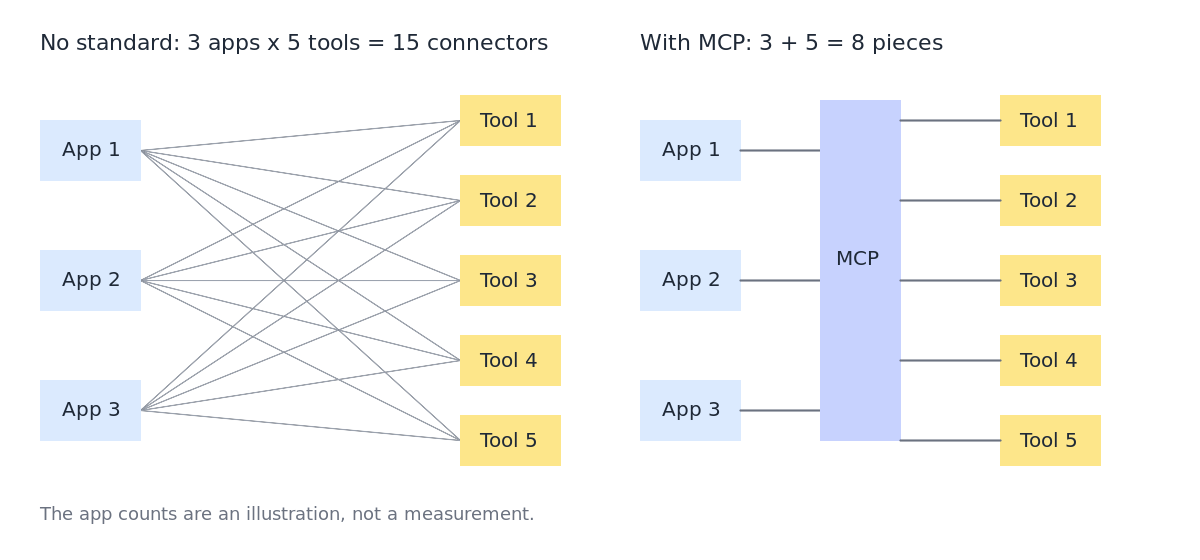
Say you use 3 AI applications and 5 tools: a CRM, a calendar, an accounting system, a file store and a support inbox. Without a shared standard, each application needs its own connector to each tool. That is 3 times 5, or 15 connectors, and each one can break when either side changes.
With a shared protocol, each tool gets one server and each application gets one client. That is 3 plus 5, or 8 pieces. The gap grows fast as you add either side.
For a solo founder this matters in a practical way. Connector code is boring, easy to get wrong and not what your customers pay for. Every hour spent on glue is an hour not spent on the problem you set out to solve.
How MCP works: hosts, clients, and servers
The MCP architecture overview describes a client-server setup with three roles. In it, a host creates one client for each server it connects to.
- Host: the AI application the person actually uses. It could be a chat app, a code editor, or an agent you built yourself.
- Client: a component inside the host. Each client keeps one connection to one server.
- Server: a small program that wraps a tool or data source and speaks MCP. It says what it can do and carries out requests.
The flow goes like this. The host starts and connects to its servers. Each server lists what it offers, with names and plain-language descriptions. When you ask the model for something, it sees those descriptions and can request a specific action. The host passes the request to the right server, gets the result, and hands it back to the model.
The model never reaches into your database directly. The host sits in the middle, and that is the spot where you can add approvals and logging.
What MCP servers can expose: tools, resources, and prompts
According to the architecture overview, a server can offer three core kinds of things. Servers can run on your own machine or remotely, and the host discovers what each one offers by asking it.
Tools
Tools are executable functions the model can ask to run, such as create_draft_email or look_up_invoice. Each has a name, a description and defined inputs. The AI Entrepreneur lesson "Tools, Loops and Why Agents Fail" covers why handing a model tools is powerful and why long chains of tool calls go wrong.
Resources
Resources are data the model can read: a file, a database row, a document. This is the same job as retrieval, which the lesson "Giving Models Your Data: Retrieval" explains. MCP gives that data a standard door to come through.
Prompts
Prompts are reusable templates that help structure interactions with a model, such as a ready-made request to summarize this week's support tickets. The server author writes one once, and every host that connects can offer it.
Why MCP matters for AI entrepreneurs
Three effects stand out for someone starting out.
- You build less glue. If a server already exists for a tool you use, you may be able to connect it instead of writing code. If you must write one, you write it once.
- Experiments get cheaper. Testing an idea often means wiring a model to your data and a few actions. A standard interface shortens the time from idea to a working demo, which fits the "smallest thing that teaches you something" approach in the lesson on the MVP and the Build-Measure-Learn loop.
- Connectors stop being a moat. If anyone can plug the same tools into the same models, "we integrate with X" is not a lasting advantage. Our post on what moats still work when anyone can call the same model covers what lasts instead: your data, your distribution and your workflow knowledge.
It also helps small teams. If you want to see how far a few people can stretch, read how a tiny team can run a large AI business. Shared standards are one way to do more with fewer people.
MCP and platform risk: staying portable across models
Building on one model provider carries a risk: prices, limits or behavior can change, and you have little say. We cover that in platform risk: building a business on someone else's model.
MCP can reduce one part of it. If your tools and data sit behind MCP servers, they are not welded to one model or one app. You can point a different host at the same servers. That makes it easier to try another model, which is useful when you are weighing options in how to choose between open and closed AI models.
Be honest about the limit, though. MCP makes the plumbing portable. It does not make the behavior portable. A different model may pick different tools, word things differently or fail in new ways. You still need a set of test cases to check quality after a swap, which is what the Advanced course "Evals: Shipping AI That Works" teaches.
Real examples of MCP in a business workflow
Here is a made-up but realistic case. You run a one-person service that helps small shops chase late invoices. You set up two servers:
- An accounting server that exposes overdue invoices as resources, read-only.
- An email server with one tool,
create_draft_email. It saves drafts and cannot send anything.
Then you give the host this prompt:
Read the overdue invoices older than 14 days. For each one, write a polite reminder in the shop owner's usual tone and save it as a draft. Do not send anything. List the drafts you created and any invoice you skipped, with the reason.
The model reads the resources, writes the text and calls the draft tool. You open the drafts, fix what you want and press send yourself. The risky step stays with a human.
This is the kind of job described in how to automate a boring workflow with AI, step by step. MCP changes how the pieces are connected, not the discipline of picking one boring task and doing it well.
Security and limits to know before you adopt MCP
A server runs real code, often with real credentials. Treat that seriously.
- Trust the source. Only run servers you wrote or have read and trust. A bad server can misuse whatever access you give it.
- Give the least access that works. Start read-only. Add write actions one at a time, and keep a human approval step before anything that sends, pays or deletes.
- Expect injected instructions. A document or web page the model reads can contain text that tries to steer it. Do not let content from outside your control trigger sensitive tools without a check.
- Verify results. Models can state wrong things with confidence, including about what a tool returned. Our post on why AI makes things up and what builders can do about it has practical defenses.
- Log tool calls. You cannot fix what you cannot see. See how to monitor an AI product in production.
- Watch cost. Tool descriptions are shown to the model so it knows what it can call, so a long list of tools can add to what a request costs. The lesson "Model APIs, Tokens and What a Request Costs" shows how to think about that.
Also remember that support varies. Not every AI application speaks MCP, and the quality of public servers varies. Check before you plan around one.
Frequently asked questions
Is MCP the same as an API?
No. An API is an interface that programs use to talk to a service. An MCP server often wraps an API and describes it in a standard way so an AI application can discover and use it without custom code.
Do I need to code to use MCP?
Not always. If your AI application supports MCP and a server already exists for your tool, you may only need to configure it. Building your own server takes some programming.
Does MCP lock me into one model provider?
It is designed as an open standard, so the idea is the opposite. Your servers can work with any host that supports the protocol, though you should still test each model's behavior.
Does AI Entrepreneur teach MCP?
There is no lesson on MCP itself. The courses on the AI product stack, agents and evals cover the ideas underneath it, and every lesson is free with an account.
Get started
MCP makes more sense once you understand model requests, tools, retrieval and testing. Those are the building blocks, and they are what the short lessons cover. Every lesson is free. Start learning with AI Entrepreneur: sign in on the home page with a 6-digit code sent to your email and take your first lesson in the browser. Each one takes 8 to 12 minutes.