How to A/B Test Two Prompts for an AI Feature
How to A/B test two prompts for an AI feature: compare them offline on one eval set, then split live users with a sample size you fix in advance.
You changed a prompt and the new one looks better. Before you ship it, you want proof. This guide shows how to A/B test two prompts for an AI feature in two stages: first offline, on the same set of test cases, then live, on real users, with a sample size you choose before you start. It uses one example the whole way through. Measuring quality instead of judging by eye is also the subject of an Advanced course in the free lessons at AI Entrepreneur.
Why you should A/B test two prompts instead of trusting a few tries
A language model does not give the same answer every time, and a prompt can look better on five inputs and worse on fifty. When you judge by eye, you remember the striking wins and forget the quiet failures.
A test fixes that. You hold everything constant except the prompt, run both versions on the same kind of input, score them the same way, and compare numbers. You end with a decision you can explain, and a record you can check when something breaks later.
Here is the example. You run a small tool that reads a customer email and returns a short ticket title and a category: Billing, Bug, Feature request or Other. Prompt A is the one in use today. Prompt B adds three worked examples and a rule that titles stay under 12 words. Which one should ship?
Step 1: Write down what "better" means first
Decide how you will score the outputs before you write Prompt B. If you decide afterward, you will pick the measure that makes your favorite win.
Use a pass or fail rule that a stranger could apply. For the ticket tool:
- Pass if the category is right, the title is under 12 words, and the title states nothing that is not in the email.
- Fail otherwise.
That gives one number per prompt: the pass rate. Keep two or three guardrails beside it, such as tokens per request, response time and broken output (a missing category). Guardrails do not pick the winner, but they can veto one. Prompt B sends three extra examples with every call, so it costs more each time. If you want the details of why, read how much an AI API call costs.
Step 2: Run both prompts offline on the same eval set
Never send real users a prompt you have not tried. Start with an eval set: inputs you already know the right answers to. If you do not have one, build an eval set step by step first.
For the ticket tool, take 50 real emails with personal details removed, and label each with its right category. Include the hard ones: an angry bug report that is really a billing question, a two-line email with no context, an email in a second language. Leave out the three emails you pasted into Prompt B as examples, or B will be graded on its own answer key.
Run both prompts on all 50 and keep everything else the same: the model and its version, settings such as temperature, and the input format. Save one row per output with the email, the prompt's version name (say ticket-v1 and ticket-v2), the output and the tokens used.
Step 3: Grade blind and read where the prompts differ
Now apply your rule from Step 1 to every row. Hide the version column and shuffle the rows first. If you know an output came from the prompt you wrote last night, you will grade it kindly.
For a larger set, a second model can do the grading, as long as you check its grades against your own on a sample first. Using an LLM as a judge covers how. Whichever you use, grade both prompts the same way, and do not change the rule halfway through.
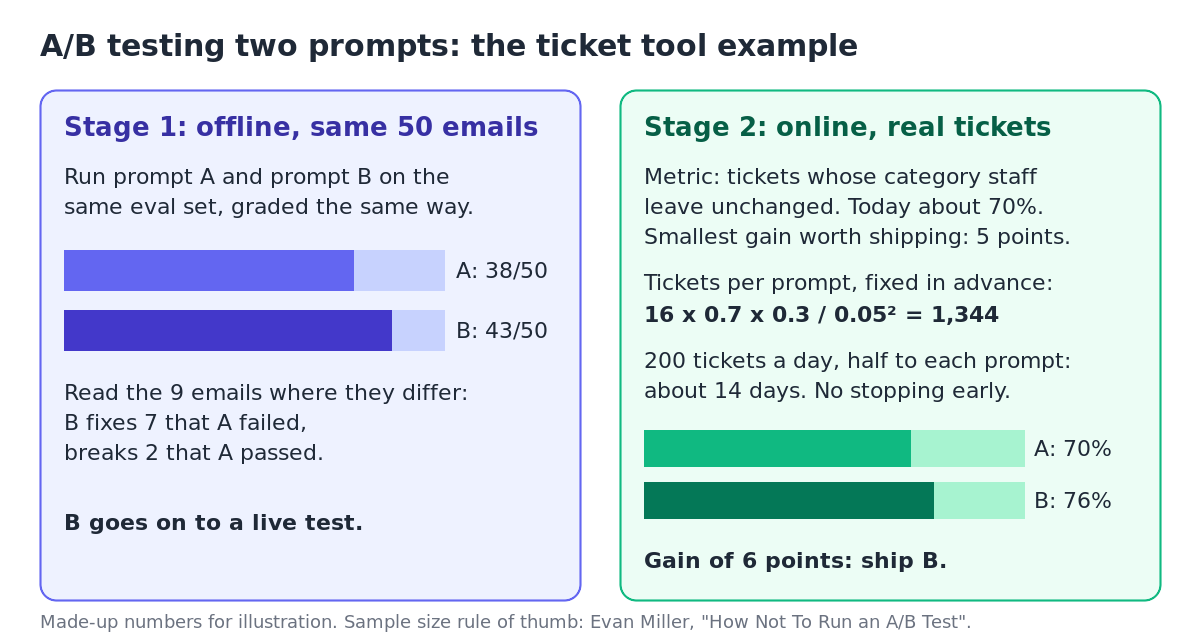
Say Prompt A passes 38 of 50 and Prompt B passes 43. Do not stop at the totals. On 50 emails, each one is worth 2 points, so B's lead rests on just 5 emails. The useful part is the emails where the two prompts disagree. Here there are 9: B fixes 7 that A failed and breaks 2 that A passed (38, minus 2, plus 7, is 43).
Read all 9. If the 7 fixes are the kind of email you see every day and the 2 breaks are rare, B is worth a live test. If the 2 breaks are your biggest customer's emails, fix B first. And if B had lost clearly offline, you would stop here and save yourself a live test.
Step 4: Split live users, not requests
Your eval set is not your users. Real emails will surprise you, so the last word comes from live traffic.
Assign each user to one prompt and keep them there. If you flip a coin on every request, the same customer can see two styles of answer in one session, and you cannot tell which prompt they reacted to. A simple way is to hash the user's ID and use the result: even goes to A, odd goes to B. If you are nervous, send a small share of users to B for a day, check nothing is broken, then move to an even split.
Pick one live measure you can count without grading by hand. For the ticket tool, the support team already corrects wrong categories, so the measure is the share of tickets whose category staff leave unchanged. Log every response with the time, the user, the prompt's version name, the input, the output, tokens, response time and whether staff changed the category.
Step 5: Fix the sample size before you start, then do not peek
Every rate you measure has noise in it, and a small sample can show a gap that is pure luck. The worst habit is to watch the numbers every day and stop the moment B pulls ahead.
Evan Miller explains why in How Not To Run an A/B Test. The significance numbers that testing tools show assume you chose the sample size in advance. If you keep checking and stop as soon as a result looks significant, you will often crown a winner that is no better. In his example, a change that did nothing, checked after every visitor for up to 150 visitors, was wrongly called a winner 26.1% of the time, not the 5% you would expect.
His fix: choose the size in advance, with a rule of thumb. Take the rate you have today, call it p, and the smallest gain worth shipping, call it d. Each prompt needs about 16 times p times (1 minus p), divided by d squared.
For the ticket tool, staff leave about 70% of categories unchanged today, and you only care about a gain of 5 points or more:
- 16 times 0.7 times 0.3 is 3.36.
- 0.05 squared is 0.0025.
- 3.36 divided by 0.0025 is 1,344 tickets for each prompt.
At 200 tickets a day, split evenly, each prompt gets 100 a day, so the test runs about 14 days. Write that date down. Halving the gain you want to detect would need four times as many tickets, which is why small tools should test big changes.
When the 14 days are up, read the result once. Say A kept 70% and B kept 76%. That gain of 6 points is larger than the 5 you planned to detect, B's guardrails held, and so B ships. If B had come in at 71%, the honest answer would be "no clear difference", and you would keep the cheaper prompt.
Mistakes that ruin a prompt test
- Changing two things at once. If you rewrite the prompt and switch models, you cannot tell which change helped. Test one change at a time.
- Testing on the prompt's own examples. Keep the examples inside Prompt B out of the eval set.
- Grading with the version visible. Hide which prompt made each output, every time.
- No version names. Without a name on every logged output, you cannot trace a bad answer back to the text that wrote it.
- Ignoring cost. A better prompt that loses money on every user is not better for the business.
Frequently asked questions
How many examples do I need to compare two prompts?
Offline, 50 to 100 cases is enough to spot a clear loser and to read where the prompts disagree. Live, use the rule of thumb in Step 5: the smaller the gain you want to detect, the more users you need.
Should I change the model and the prompt at the same time?
No. Run one test that changes only the prompt and a separate one that changes only the model, or you cannot tell which change caused the result.
Can I A/B test prompts without writing code?
Yes, for the offline stage. Run each prompt by hand, paste the outputs into a spreadsheet, hide the version column, shuffle the rows and grade each one against your rule.
How long should a live prompt test run?
Until it reaches the sample size you chose before starting. If your traffic changes by weekday, cover at least one full week, and never stop early because one prompt pulls ahead.
Get started
Comparing prompts is one part of shipping AI that works. On AI Entrepreneur, the Advanced course "Evals: Shipping AI That Works" covers why your AI product needs evals, building an eval set and judging outputs, and running AI in production. The Intermediate course "The AI Product Stack" opens with a lesson on model APIs, tokens and what a request costs. Lessons take 8 to 12 minutes, each lists its sources, and questions from lessons you finish come back later, spaced out so they stick, up to 5 a day.
Every lesson is free. Start learning with AI Entrepreneur: sign in on the home page and take your first short lesson today.