How to Monitor an AI Product in Production
Learn how to monitor an AI product in production: what to track, how to catch bad outputs, control costs, and set alerts so small teams stay ahead of problems.
If you want to know how to monitor an AI product in production, start with one fact: the thing you shipped can fail while every server light stays green. The model answers, the page loads, and the response is still wrong, slow, too expensive or unsafe. This guide gives a small team a monitoring setup it can build in a week. It also ties in with the "Running AI in Production" lesson in the Evals course on AI Entrepreneur, a free web app of short lessons on building a business with AI.
Why monitoring an AI product is different from monitoring normal software
Normal software fails loudly. A server crashes, an error code appears, a page does not load. You watch uptime and error rates, and you know when something broke.
An AI product fails quietly. The model returns a confident, well-formed answer that is wrong. Nothing throws an exception. Your uptime chart looks perfect while customers get bad output.
Three more things make it harder:
- The same input can give different outputs. You cannot just replay a bug and expect it to repeat.
- Every request has a variable cost. A long prompt or a long answer costs more than a short one, so your bill depends on how people use the product.
- The model can change under you. If you call someone else's model, its behavior can shift without any change on your side, so you need to notice when answers get worse.
So you need the usual checks plus a layer that looks at what the model actually said. Our post on why AI makes things up explains why that layer is not optional.
How to monitor an AI product in production: quality, cost, latency and safety
Keep the list short. Four things cover most of what goes wrong.
- Quality. Is the answer correct and useful for the task?
- Cost. What does each request, user and feature cost you?
- Latency. How long does the user wait? Track the slow tail, not just the average, because the slowest requests are the ones people remember.
- Safety. Does the product ever produce something it should not, such as leaked private data, off-topic replies or content that breaks your rules?
Use one running example for the rest of this post. Say you built a tool that drafts replies to customer support emails. A good reply is accurate, on-brand and cheap to produce, and it arrives in a few seconds. Each of the four things applies directly.
Log every request so you can debug real user failures
Logging is the base for everything else. Without it, a complaint like "the tool gave me a weird answer" is a dead end. With it, you can open the exact request and see what happened.
For each call to the model, store:
- A request ID and a timestamp.
- The user ID (or an anonymous ID) and which feature made the call.
- The full prompt you sent, including any retrieved documents or system instructions.
- The model name and version, and any settings you changed.
- The full response.
- Input tokens, output tokens, and the cost you worked out from them.
- Time taken.
- Any error, retry or fallback that happened.
The prompt is the field people forget. Most bad answers come from what went into the model, such as a missing document or a stale instruction, and not from the model itself. If you only log the response, you cannot tell which it was.
Think about privacy before you start. Logs hold user text. Decide how long you keep them, who can read them, and what you strip out. Only log what you need, and tell users what you store.
Track output quality with user feedback and automated checks
Quality is the hardest of the four, because no single number says "correct." Use two sources together.
User signals
Add cheap feedback to the product itself. In the support example, a thumbs up or down on each draft works. Better still, watch what people do with the output:
- Did they send the draft as written?
- Did they edit it heavily?
- Did they throw it away and start over?
- Did they regenerate it three times in a row?
Behavior is more honest than a rating. A draft that gets rewritten every time is failing, even if nobody clicks the thumbs down.
Automated checks
Users only report a fraction of problems, so add checks that run on a sample of live traffic. Start with the simple ones:
- Rule checks: Is the reply under a length limit? Does it include a required disclaimer? Does it avoid banned phrases?
- Format checks: If the model must return structured data, does it parse?
- Grounding checks: If the reply cites a refund policy, does that policy exist in the documents you retrieved?
- Model-as-judge checks: Ask a second model to grade the reply against a short rubric. Use this on a small sample, and spot check the judge by hand now and then.
Track the pass rate over time. A sudden drop after a prompt change or a provider update is your signal. If the idea of scoring outputs is new to you, read what LLM evals are and why your AI product needs them.
Watch costs per user and per feature before they eat your margin
An AI product has a real cost on every request. That makes cost a monitoring problem, not just a finance one. A few heavy users or one badly designed feature can turn a profitable product into a money-losing one without any single bad day.
Because you logged tokens and cost on every call, you can answer these questions:
- What is the average cost per active user per month?
- Which feature costs the most?
- Who are the top 1 percent of users by spend, and how does their spend compare with what they pay you?
- Did the cost per request jump after your last change?
In the support tool, you might find that drafting a reply costs little, but the "summarize the whole thread" button sends a huge prompt every time. That is a cost leak you can only see if you break spend down by feature.
Set a per-user or per-request ceiling so one runaway loop cannot drain your budget. Then compare your costs with your prices. Our posts on pricing an AI product without losing money per user and how AI company economics differ from SaaS show how these numbers feed into your margin. The AI Product Stack course on AI Entrepreneur also has a lesson on tokens and what a request costs.
Set alerts and dashboards a small team can actually maintain
Most small teams fail here by building too much. A dashboard nobody reads and an alert that fires daily are both worse than nothing, because people learn to ignore them.
Start with one dashboard that fits on a screen:
- Requests per day.
- Error and retry rate.
- Slow-tail latency.
- Cost per day and cost per active user.
- Automated quality pass rate.
- Share of drafts users sent unchanged, or your nearest equivalent.
Then add only a few alerts, each tied to an action:
- Daily spend passes a number you chose in advance.
- Error rate stays high for more than a few minutes.
- Quality pass rate drops well below its usual level.
- A safety check fires at all. Safety alerts should be rare, so you can afford to look at every one.
For each alert, write down one line: who looks at it and what they do first. If you cannot write that line, delete the alert. A tiny team can run a lot with a small, sharp setup, which is the idea behind how a tiny team can run a large AI business.
Turn production failures into new evals and prompt fixes
Monitoring only pays off if what you find changes the product. The best habit is a short loop you run every week.
- Collect the failures. Pull the requests with thumbs down, heavy edits, failed checks or support complaints.
- Read them. Open twenty by hand. Group them by cause: missing context, a vague instruction, a wrong fact, a format slip, or a case you never expected.
- Add them to your eval set. Each real failure becomes a test case with the input and a description of a good answer. Your eval set now grows from real use and not from guesses.
- Fix and test. Change the prompt, the retrieval or the model choice. Run the whole eval set to confirm you fixed the new case without breaking old ones.
- Ship and watch. Release the change and check that your dashboard numbers move the right way.
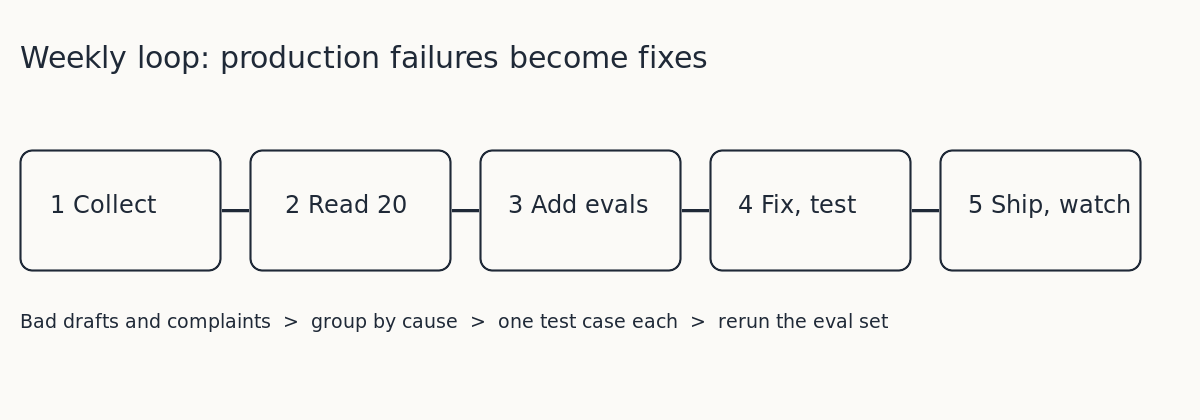
This is how a product improves instead of drifting. Every failure that reaches a user becomes a test that stops the same failure from coming back. If you are choosing a model as part of a fix, how to choose between open and closed AI models covers the tradeoffs.
Frequently asked questions
What is the first thing I should monitor in an AI product?
Log every request with the full prompt, the response, the token counts and the time taken. Everything else, from quality scoring to cost tracking, is built on those logs.
How do I measure quality if there is no single right answer?
Combine user behavior, such as whether people send, edit or discard the output, with automated checks against a short rubric. Track the pass rate over time and watch for sudden drops.
How often should I review production failures?
Weekly works for most small teams. Read a set of real failures, turn them into eval cases, fix the cause and rerun your evals before you ship.
Do I need expensive monitoring tools to start?
No. Structured logs, a simple dashboard and a handful of alerts cover the first stage. Add more only when a specific problem shows you need it.
Get started
The Evals: Shipping AI That Works course on AI Entrepreneur is about measuring quality instead of judging by eye: why evals matter, how to build an eval set, and how to run an AI product in production. Lessons take 8 to 12 minutes each. For the cost side, the AI Product Stack course is about model APIs, tokens and what a request costs.
Every lesson is free. Start learning with AI Entrepreneur: sign in on the home page with a 6-digit code sent to your email and take your first short lesson today.