How a Tiny Team Can Run a Large AI Business
How a tiny team can run a large AI business: measure the human time each customer costs, automate the repeatable work first, and keep people on judgment and quality.
How a tiny team can run a large AI business comes down to one change: the work that used to need many people can now be done by software that you direct. A handful of people can serve many customers if they design the business around leverage instead of headcount. This post shows how to do that, step by step, and where it breaks.
The ideas here follow the Advanced course on scaling an AI company in AI Entrepreneur, a free web app of short lessons on building a business in the age of AI. One of its lessons is called "Tiny Teams, Huge Leverage".
How a tiny team can run a large AI business: why it works now
Every platform shift has made something expensive cheap. The app's course on platform shifts looks at PCs, the internet, cloud and mobile, and what each one made cheap. AI makes routine knowledge work cheaper: drafting, sorting, summarizing, answering and checking.
If a model can do a first pass on that work, a person no longer has to. Your team's job shifts from doing the work to designing, supervising and fixing the system that does it. That is why a small group can cover ground that once needed a department.
It is not magic. Models make mistakes, and the lesson "What AI Gets Wrong" is about the limits every builder must design around. Plan for the errors.
What "large" really means: revenue, customers, and workload
"Large" is vague, so split it into three things you can measure.
- Customers: how many people you serve at once.
- Revenue: how much money comes in against what it costs to serve them.
- Workload: how many tasks, requests and decisions flow through the business each week.
A tiny team does not need to be large on all three at once. Most of the time the hard limit is workload. Each new customer creates support questions, onboarding steps, billing issues and quality checks. If every one of those needs a human, you hire as you grow. If most are handled by a system, you do not.
So the useful question is not "how many people do we need?" It is "how much human time does one more customer cost us?" Drive that number down and the team can stay small.
Design the business around leverage, not headcount
Start from the unit economics, not the org chart. The Basic course "Business Basics for Builders" is about revenue, costs and unit economics, and the Advanced lesson "The Economics of AI Companies" is about how AI companies differ. Our post on AI company economics and how they differ from SaaS goes deeper. The short version: an AI product has a cost on every request, so serving a customer is never free.
That changes how you plan. You are managing two costs per customer:
- The model cost of each request they make.
- The human time they pull in when something goes wrong or needs judgment.
Price so the first stays covered, and build so the second stays small. The Intermediate course "Launch, Price and Get Paid" has a lesson on pricing AI products without losing money on every user.
A worked example
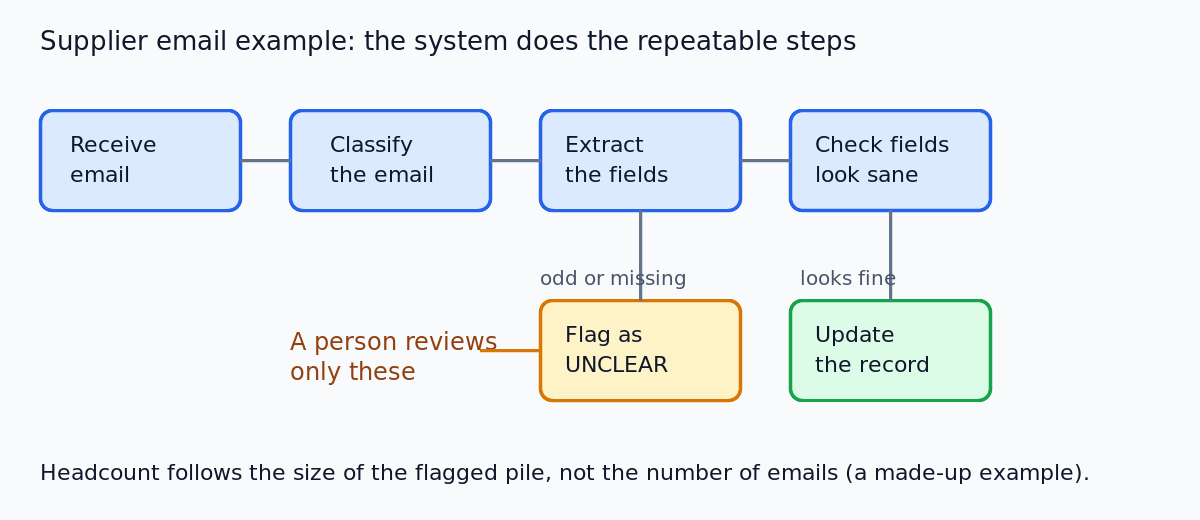
Imagine a two-person company that offers a service for small shops: it reads incoming supplier emails, pulls out the order details, and updates the shop's records. This is a made-up example, but the shape is common.
Map the work as a list of steps: receive email, classify it, extract fields, check the fields look sane, update the record, flag odd ones for a person. Now mark each step as "repeatable" or "needs judgment". The first four and the update are repeatable. Only the flagged odd ones need a human. Your headcount is set by the size of that last pile, not by the number of emails.
Automate the repeatable work first
Begin with the boring, high-volume, rule-shaped tasks. They are the easiest to get right and the easiest to check.
Use a fixed workflow before anything fancier. A workflow runs the same steps in the same order every time, so it is cheap to test. The Intermediate course "Your First Builds" has a project on automating one boring workflow, and our step-by-step guide to automating a boring workflow with AI shows the process.
For the model part of each step, a prompt-powered micro tool is often enough. If you have not built one, read how to build a simple AI tool from one good prompt.
A simple prompt for the extraction step in the example might read:
You will receive a supplier email. Return the supplier name, item names, quantities and delivery date. If any field is missing or unclear, write "UNCLEAR" for that field. Do not guess.
The last two sentences matter. They give the system a way to say "a human should look at this", which is what keeps the small team small.
Use AI agents for support, sales, and operations
Once the fixed workflows are stable, you can consider agents for work that does not follow a set path. The Advanced course "Agents and Automation" is about when to use a workflow and when an agent. A rule of thumb: if you can write the steps down in advance, use a workflow. Reach for an agent only when the path depends on what the system finds along the way.
Three places a small team often looks first:
- Support: answer common questions, look up an account, and hand off to a person when the case is unusual or the customer is upset.
- Sales: sort inbound leads, draft first replies, and prepare notes before a call.
- Operations: reconcile records, chase missing information, and prepare weekly summaries.
Be careful with length. The course on agents also looks at why long chains of steps fail. Each step can go wrong, so the more steps in a row, the more chances for an error to carry forward. Keep agents to short, bounded jobs with a clear stop and a clear way to escalate.
Keep humans on judgment, trust, and quality (with evals)
The people on a tiny team should spend their time where a mistake costs the most: judgment calls, customer trust, and quality control.
Quality is the part teams skip. If you judge outputs by eye, you will miss slow drops in quality, and you will not know whether a change to a prompt or model made things better or worse. The Advanced course "Evals: Shipping AI That Works" is about measuring quality instead. The core move is an eval set: real example inputs with the answers you expect, which you run every time you change something. Our guide to building an eval set for an AI feature walks through it.
For the supplier email example, that means saving a set of real emails with the correct extracted fields, then checking every new version of your prompt against them before it goes live. A small team cannot read every output. An eval set reads them for you and tells you where to look.
Keep humans in two other places too. First, review the cases the system flags as unclear. Second, talk to customers directly. The Intermediate course on finding AI opportunities is about testing ideas by talking to customers, and our post on validating a business idea with customer interviews shows how to do it without fooling yourself. Automation should not cut you off from the people you serve.
Manage the risks: platform dependency, costs, and failure modes
A tiny team running on AI carries three risks that a bigger team could absorb with spare people.
Platform dependency
If your whole product rests on one model provider, a change to its price, terms or behavior lands on you. The lesson "Building on Someone Else's Model" covers this, and our post on platform risk explains how to think about it. One practical step: keep your prompts and eval set in your own hands, so you can test a different model quickly.
Cost
Model costs grow with usage. The course "The AI Product Stack" has a lesson on model APIs, tokens and what a request costs. Estimate the cost of a request before you set a price, and check it again as usage grows.
Failure modes
Plan for the system being wrong, slow or down. Decide in advance what happens: who gets alerted, what the customer sees, and how you fix it. The lesson "Running AI in Production" is about running an AI product in production. A tiny team survives by having few things that can break and a clear response to each.
Frequently asked questions
How many people do you need to run an AI business?
There is no fixed number. It depends on how much human time each customer needs, so measure that and work to lower it.
Can one person run a large AI business?
It is possible to build something that serves many customers with very few people, but the limits are real: errors, support load and your own time. Start small, automate one workflow, and add more only when you can measure that it works.
Which tasks should a small team automate first?
Start with repeatable, high-volume tasks that follow clear rules and are easy to check, such as sorting, extracting and drafting. Leave judgment calls and customer trust with people.
How do AI company economics let small teams scale?
When a system does the routine work, the human time per customer drops, so revenue can grow without hiring at the same rate. But each request has a model cost, so you must price to cover it. The lesson "The Economics of AI Companies" covers the details.
Get started
Every lesson is free. Start learning with AI Entrepreneur: sign in on the home page and take your first short lesson today. The Advanced course on scaling an AI company has lessons on the economics, tiny teams and a roadmap from a first project to a company.