What Is an AI Agent and How Is It Different From a Chatbot
A plain definition of an AI agent, how it differs from a chatbot, the same refund task done both ways, and how a founder chooses between a chatbot, a workflow and an agent.
If you have used ChatGPT or a website help bubble, you have used a chatbot. If you have heard that "agents" are the next step, you may wonder what actually changed. This guide answers the question what is an AI agent, and how is it different from a chatbot, in plain terms, with one task done both ways. It is written for people who want to build with AI, so it ends with how to choose between the two. If you want to learn this step by step, AI Entrepreneur is a free web app of short lessons on building a business with AI.
What is an AI agent, and how is it different from a chatbot? A plain definition
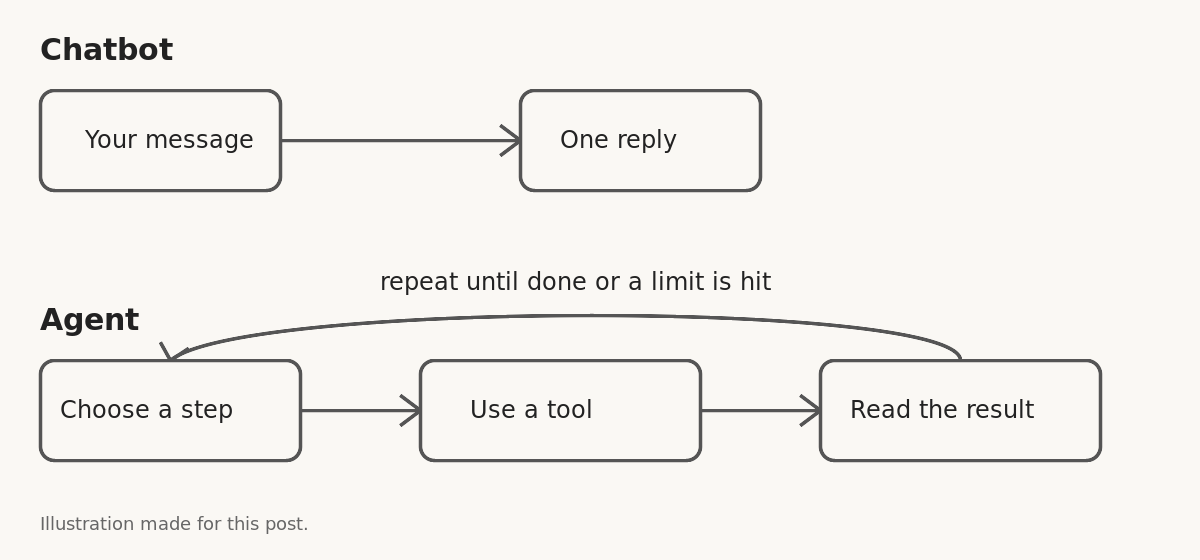
An AI agent is a program that uses a language model to pursue a goal by taking actions, not just by writing replies. Anthropic, in its engineering post Building effective agents, describes agents as systems where the model dynamically directs its own process and tool use, and workflows as systems where models and tools follow predefined code paths. You give it a job. It decides the next step, uses a tool to do that step, looks at the result, and decides again. It stops when the job is done or when it hits a limit you set.
The key word is actions. A chatbot produces text for you to read. An agent produces changes in the world: a record updated, an email drafted and queued, a file created, a refund issued.
What is a chatbot, and where does it stop?
A chatbot is a conversation with a model. You send a message, the model sends one back. Under the hood, a language model predicts the next piece of text, and training turns that raw predictor into a helpful assistant. That is what you talk to.
A chatbot can be very useful. It can explain a concept, draft a paragraph, summarize a document you paste in, or answer questions from a help center. But it stops at the edge of the chat window. It can tell you how to cancel an order, but it cannot cancel one.
That last point matters, because the line between the two is not sharp. Some chatbots can look things up or call a function. The useful question is not "what is this called?" but "how much does it decide and do on its own?"
AI agent vs chatbot: the key differences
- Output. A chatbot returns words. An agent returns words and also does things.
- Turns. A chatbot answers once per message. An agent may take many steps after a single request.
- Control. In a chatbot, you steer every turn. In an agent, the model chooses its own next step inside limits you define.
- Access. A chatbot only needs the conversation. An agent needs tools and permissions, such as read access to a database or the right to send a message.
- Risk. A chatbot's worst case is usually a wrong answer. An agent's worst case is a wrong action.
- Testing. You can read a chatbot reply and judge it. An agent run is a chain of decisions, so you have to check the whole path, not just the last message.
The four parts that make an agent work: model, tools, memory, and a loop
1. The model
The language model is the part that reads the situation and picks what to do next. It does the thinking, with all the limits of any model. It can state wrong things with confidence, which is why the Basic lesson "What AI Gets Wrong" matters even more once the model can act.
2. Tools
Tools are the actions the agent is allowed to take. Each one is a small, defined function: "look up an order by ID," "create a draft reply," "add a row to a sheet." The agent cannot do anything you did not give it a tool for. That makes the tool list your first and best safety control. A standard way to connect models to tools is covered in our post on MCP, the Model Context Protocol.
3. Memory
Memory is what the agent knows about the job so far: your instructions, the results of earlier steps, and any notes it carries forward. Without it, each step would start blank. Keep it small and relevant.
4. The loop
The loop is the engine. The agent looks at the goal and the record so far, chooses a step, runs the tool, adds the result to its memory, and repeats. A good loop has an exit: a clear definition of "done," a maximum number of steps, and a rule for when to stop and ask a person.
Take away the tools and the loop and what is left is a chatbot. That is a fair way to remember the difference.
Real examples: the same task done by a chatbot and by an agent
Say you run a small online shop. The shop, the customer and the 30-day policy are made up for this example. A customer writes: "My order arrived damaged. Can I get a refund?"
The chatbot version
The chatbot has your refund policy in its instructions. It replies: "I'm sorry about that. Refunds for damaged items are available within 30 days. Please reply with your order number and a photo." The customer then sends the details, and a person on your team looks up the order, checks the date, and issues the refund by hand. The chatbot saved you one typed message. The work is still yours.
The agent version
You give the agent a goal: "Resolve refund requests for damaged items under the written policy." Here is the shape of its run:
- It uses a tool to find the customer's order from their email address.
- It checks the order date against the policy window.
- It checks the order total against a limit you set, say refunds above a certain amount always go to a person.
- If everything is inside the rules, it uses a refund tool and writes the customer a confirmation. If anything is unclear or over the limit, it drafts a note for your team and stops.
The agent finished the job for the easy cases and handed off the hard ones. That is the real value, and also the real danger: it touched your payment system.
When to build a chatbot and when to build an agent
Do not reach for an agent by default. Start with the simplest thing that does the job.
- Build a chatbot when the value is in the answer: explaining, drafting, searching a body of text, tutoring. A person reads the result and decides what to do.
- Build a fixed workflow when the steps are known and the same every time. A fixed sequence of model calls and tool calls is easier to test and cheaper to run than an agent that decides its own path.
- Build an agent when the path really does vary, so you cannot write the steps in advance, and the job is valuable enough to justify the testing it needs.
Anthropic's advice in the post above is the same: find the simplest solution possible, and add complexity only when needed. The Advanced course "Agents and Automation" in AI Entrepreneur has a lesson called "Workflows Versus Agents" about this choice. If you have never built anything with AI, it is better to start smaller. Our guide to building your first AI product without writing code is a good first step.
Risks and limits of AI agents founders should plan for
Long chains of steps fail
Each step in a run can go wrong. Imagine a step that works nine times in ten. Chain ten of them and the whole run succeeds only about 35 percent of the time (0.9 multiplied by itself ten times). This is a made-up number to show the arithmetic, not a measurement of any real system. The lesson is real, though: short runs with clear exits beat long, open-ended ones. The lesson "Tools, Loops and Why Agents Fail" in the Agents and Automation course is about this.
Wrong actions cost more than wrong answers
Give the agent the least power that lets it do the job. Prefer tools that draft over tools that send. Put caps on money and volume. Require a human to approve anything that cannot be undone. Our post on how to build an AI agent that does a real job safely goes into this in more detail.
You cannot judge it by eye
One good demo proves little. Build a set of test cases and score the agent against them every time you change it. The Advanced course "Evals: Shipping AI That Works" is about this; its first lesson is "Why Your AI Product Needs Evals."
It keeps running after you ship it
Once real customers use the agent, you need to see what it did and why. Log every step and tool call, and watch for cost and failures. See how to monitor an AI product in production.
Frequently asked questions
Is ChatGPT an AI agent?
A plain chat with a model is a chatbot. It acts more like an agent only when it is connected to tools and allowed to take multiple steps toward a goal on its own.
Do I need to code to build an AI agent?
Not always. Some agent setups can be built with no-code tools, but you still have to design the tools, limits, and tests carefully. The thinking matters more than the typing.
Are AI agents safe to use with real customers?
They can be, if you limit their tools, cap what they can spend or change, keep a person in the loop for risky actions, and test them before and after launch. Skipping those steps is where problems start.
Is an agent always better than a chatbot?
No. If a person just needs an answer, a chatbot is simpler, cheaper, and easier to trust. Use an agent only when the job needs actions and the path varies.
Get started
You can learn the ideas behind chatbots and agents in order. The Basic course "How Modern AI Actually Works" is about what a language model does and where it goes wrong. The Advanced course "Agents and Automation" has the lessons "Workflows Versus Agents", "Tools, Loops and Why Agents Fail" and "Project: An Agent That Does a Real Job". In total there are 12 courses and 36 lessons, each about 8 to 12 minutes.
Every lesson is free. Start learning with AI Entrepreneur: sign in on the home page with the 6-digit code sent to your email and take your first short lesson today.